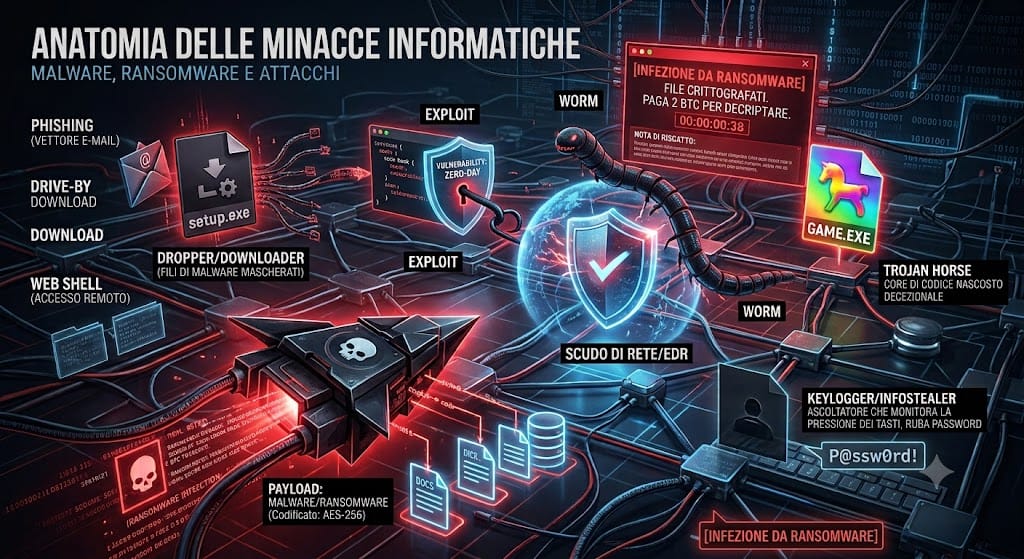
In today’s cybersecurity landscape, cyberattacks are not isolated or random events, but structured, engineered, and layered processes. Understanding the terminology, how they work, and how to distinguish between the various types of malicious code is a fundamental step in defending any infrastructure, from a single corporate PC to shared network servers.
In this article, we will analyze in detail the entire ecosystem of cyber threats : from the macro-category of malware to social engineering techniques, up to saturation attacks and next-generation threats.
1. Computer Threats: The Large Malware Family
The term Malware (Malicious Software) includes any type of code or program developed with the intent to damage, exploit, manipulate, or unauthorized access to a device, server, or network.
Virus vs. Worm: I Propagatori
Virus: This is malicious code that requires human intervention to activate and a “host” (a legitimate file, such as an .exe executable or a Word document) to attach itself to. When the user opens the infected file, the virus activates and infects other files on the system.
Worm: Unlike viruses, worms are independent. They don’t need to attach themselves to an existing file or require user intervention. They exploit network vulnerabilities to replicate autonomously from computer to computer, saturating bandwidth and infecting entire corporate networks.
Trojan Horse (Trojan Horses)
Named after Greek myth, they present themselves as completely legitimate, useful, or free software (a game, a system utility, a crack). Once installed by the user, they open a backdoor or release the real threat hidden within.
Ransomware: Digital Blackmail
This is the most profitable threat for cybercriminals. Ransomware penetrates the system, locates sensitive files (documents, databases, images), and encrypts them using complex algorithms, rendering them unreadable. It then generates a screenshot or text file (Ransom Note) demanding a ransom in cryptocurrency for the decryption key.
Double Extortion: Today’s ransomware doesn’t just encrypt data. Before doing so, attackers exfiltrate (steal) sensitive data. If the victim has a backup and refuses to pay, the hackers threaten to publish the data online or sell it to a competitor.
Spyware, Keyloggers, and Infostealers: The Silent Thieves
Spyware: Software designed to spy on a user’s activity without their knowledge, collecting browsing history, habits, and personal data.
Keylogger: A specific type of spyware that records every single keystroke on the keyboard. It is primarily used to capture passwords and banking credentials.
Infostealer: Malware that specializes in scouring web browsers for saved passwords, credit card details, and session cookies (used to bypass two-factor authentication).
Rootkits and Bootkits: The Ghosts of the System
Rootkit: A set of software tools that allow an attacker to gain deep administrative (root) level access to the operating system, actively hiding their presence from traditional antivirus programs.
Bootkit: An even more advanced version of the rootkit that infects the Master Boot Record (MBR) or UEFI firmware. By loading itself before the operating system boots, it becomes virtually invisible and even resists hard drive formatting.
Adware and Cryptojacking: Exploitation and Passive Income
Adware: Malware that focuses on continuously displaying invasive banner ads and pop-ups to the user, slowing down the browser and tracking browsing behavior.
Cryptojacking (or Drive-by Mining): A hidden script or software that uses the computing power (CPU/GPU) of the victim’s device without their knowledge to mine cryptocurrencies, causing overheating, hardware wear, and noticeable slowdowns.
2. Distribution Channels: Spam and Phishing
Malware requires a means of transport. Cybercriminals’ favorite channels include email and psychological manipulation.
Spam (and Malspam)
Spam refers to the mass and indiscriminate sending of unsolicited messages. While much of it consists of aggressive advertising, it is also a major vector for the large-scale distribution of malware (known as Malspam). These mass emails conceal infected attachments or links to compromised websites.
Phishing: The Art of Deception
Phishing is a social engineering technique that is much more targeted and subtle than generic spam. Attackers craft emails, SMS (Smishing), or chat messages that perfectly mimic communications from authoritative and trusted sources (banks, couriers, hosting providers, or even co-workers).
Credential theft phishing: The email contains a link that takes you to a fake login page that looks identical to the real one and attempts to steal the credentials you enter.
Phishing for malware delivery: The email tricks the user into opening a malicious attachment (e.g., a fake invoice in .zip or .xlsm format with macros enabled) which triggers the infection.
Spear Phishing: A targeted variant in which the email is meticulously customized to target a single, specific person (by first studying their corporate role), dramatically increasing the scam’s chances of success.
3. The Chain of Infection: Files and Technical Components
When a victim falls for an email or downloads a suspicious file, attackers use a chain of specialized files to bypass perimeter defenses before launching the final attack.
| Component | Main Role in the Attack |
| Payload | The final code that performs the actual damage (e.g. encrypts files or exfiltrates data). |
| Dropper | A seemingly harmless “container” file that extracts the malware once launched. |
| Downloader | A lightweight file that connects to a remote server (C2) to download the actual payload. |
| Obfuscator / Packer | Tools used to hide and encrypt malicious code, fooling antivirus signatures. |
Web Shells: The Nightmare of Web Servers
When the target isn’t a single PC but a web server (for example, an environment hosting WordPress sites), hackers attempt to load a Web Shell. This is a script (written in server languages such as PHP, ASP, or JSP) that provides the attacker with a full remote control interface. Through the Web Shell, the hacker can send commands to the server, modify site files, steal database data, or spread malware and phishing attacks using the victim’s legitimate domain.
4. Advanced Attack Techniques and Network Manipulation
Drive-by Attacks Download
In this scenario, the user becomes infected simply by visiting a compromised website. There’s no need to click any download buttons. The infected site contains hidden malicious scripts that automatically exploit vulnerabilities in the user’s browser or plugins to install malware in the background.
Exploit Kits and Zero-Day Vulnerabilities
Exploit: A piece of code that takes advantage of a programming error (vulnerability) in software to perform unauthorized actions and escalate system privileges.
Zero-Day: A newly discovered vulnerability for which the software vendor has not yet released a security patch. Zero-day attacks are extremely difficult to detect because standard defenses do not yet know how to recognize them.
Credential Stuffing e Brute Force
Instead of using a malicious file, attackers use automated scripts to attempt to access exposed services (such as SSH, RDP, or CMS control panels) by trying thousands of password combinations (brute force) or using lists of credentials leaked in previous breaches of other sites (credential stuffing). Once inside, they manually install the chosen ransomware or malware.
Malware Fileless (Senza File)
A modern attack technique in which the malware doesn’t write any files to the hard drive (avoiding traditional file-based antivirus scans). Instead, it leverages legitimate, pre-authorized tools within the operating system (such as PowerShell or WMI) to execute the malicious code directly in RAM.
Interception and Manipulation Attacks (MitM and DNS)
Man-in-the-Middle (MitM): An attacker secretly inserts himself into communications between two parties to intercept, decrypt, or modify the data exchanged (e.g., stealing login sessions on public or unsecured Wi-Fi networks).
DNS Spoofing / Poisoning: The local cache or DNS server is tampered with to redirect traffic from a legitimate domain to a hacker-controlled IP server, redirecting the user to a perfect clone site.
DoS e DDoS (Distributed Denial of Service)
Unlike traditional malware, the goal isn’t data theft or blackmail, but service disruption. Attackers coordinate a network of thousands of infected devices (called a botnet) to bombard a server, website, or entire network with simultaneous traffic, exhausting its resources (CPU, RAM, bandwidth) and taking the infrastructure offline.
APT (Advanced Persistent Threats)
Long-term, targeted attack methods, typically orchestrated by highly skilled hacker groups (often sponsored by sovereign states). They penetrate a network and remain hidden for months or years, operating extremely silently with the sole purpose of carrying out industrial, financial, or geopolitical espionage.
5. Essential Defense Strategies
To counter such a diverse ecosystem of threats, security must be structured like an onion, that is, with multiple levels of active and passive protection:
Staff Training: The human factor is the first line of defense. Knowing how to distinguish harmless spam from a targeted phishing email stops an attack before it even begins.
Mail Server Protection and Reputation: Implement advanced anti-spam filters, reputation lists (RBL), and correctly configure authentication records (SPF, DKIM, DMARC) to block the receipt or sending of spoofed emails at the outset.
Vulnerability Management (Patch Management): Keeping your operating systems, CMS, and all plugins up to date dramatically reduces the chances of a successful exploit or automated attack.
EDR / Next-Generation Antivirus Systems: Traditional antivirus programs based solely on static “signatures” are no longer sufficient against polymorphic or fileless malware. We need EDR (Endpoint Detection and Response) solutions that analyze anomalous process behavior in real time.
Immutable Backup Strategy: The only real salvation against ransomware is to use secure hosting solutions with a solid backup strategy (3-2-1 rule: three copies, two different media, one off-site/cloud), preferably with immutability logic that prevents ransomware from encrypting or deleting the backups themselves.
Conclusions: Towards Proactive Cyber-Resilience
The cyber threat landscape has shown that the question is no longer “if” your infrastructure will be attacked, but “when.” As we’ve seen, cybercriminals don’t rely on a single tool, but orchestrate entire infection chains in which spam and phishing open the door to viruses, worms, droppers, and ransomware, working together to bypass traditional defenses.
Faced with such sophisticated and dynamic threats, security can no longer be considered a cost or a purely reactive intervention. Protecting a digital ecosystem requires cyber resilience: the ability not only to erect barriers, but also to promptly detect an anomaly, isolate it, and restore systems quickly without succumbing to extortion.
Implementing a multi-layered defense is the only real way to defuse the attack chain before the payload can cause irreparable damage. Cybersecurity is a continuous journey, and awareness is the first, fundamental shield.
